
Screenpipe SDK · for builders
Desktop workflow capture for AI agents.
Embed Screenpipe's capture engine in your Electron, Tauri, or native app. Cross-platform screen + audio + OCR + accessibility capture for agent evals, workflow observability, training data, and automation products without burning 18 months on OS edge cases.
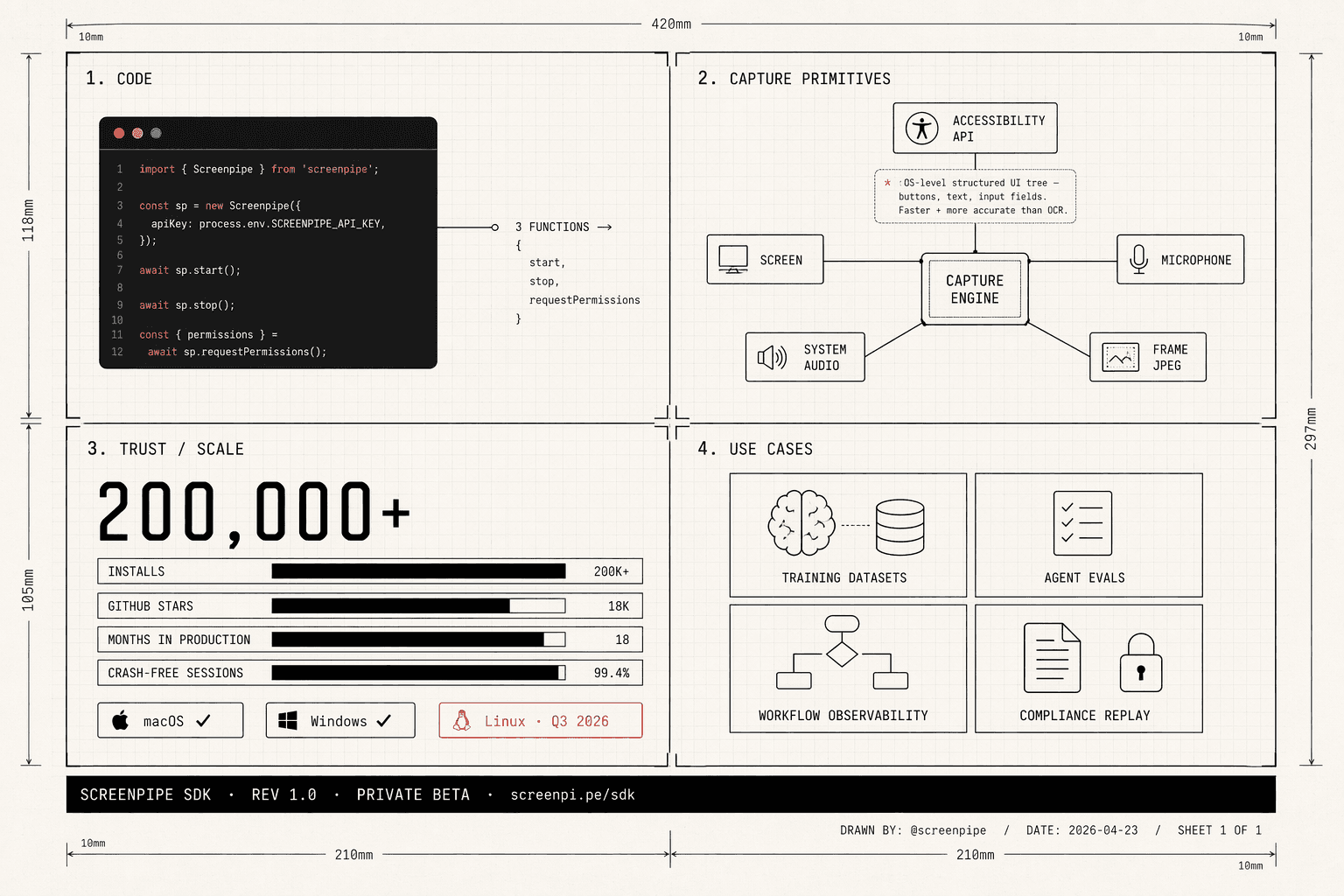
Building screen capture is a tar pit.
Different OS permissions. Audio routing. Accessibility APIs that change every year. DRM edge cases. macOS vs Windows vs Linux. Sleep/wake cycles eating CPU. PII.
We've been shipping it for 18 months across 200K+ installs. License the capture engine and build what actually differentiates your product.
What you get.
Drop-in capture engine
Bundle Screenpipe with your app. Exposes a local HTTP API; call from any language — TypeScript, Python, Rust, Swift. We handle the lifecycle.
Cross-platform, production-hardened
macOS (Apple Silicon + Intel), Windows x64 + ARM. Accessibility API for fast OCR-less capture. Audio routing handled. Battery-aware.
Local-first by design
Core capture can run on the device. Optional sync, cloud AI, redaction, and partner data paths are scoped by the embedding architecture and customer agreement.
Commercial embedding license
Priority support, SLA, roadmap input, dedicated engineer. White-label options available under OEM.
Private beta · enterprise only
Confidential-inference PII redaction.
For fintech, healthcare, insurance, and other regulated verticals: we run OpenAI's Privacy Filter model inside a confidential-compute enclave for selected enterprise deployments. Buyers can review the model, provider route, attestation posture, and retention assumptions before production.
8 PII categories detected
Names, addresses, emails, phone numbers, URLs, dates, account numbers, and secrets. Benchmark and customer-data validation should be reviewed before production rollout.
Open weights, confidential inference
Hosted inside TEE-backed GPU enclaves for approved deployments. Attestation and provider details are part of the enterprise security review.
deployment modes
Local-first does not mean one data path.
Screenpipe can run as a local-only personal assistant, a scoped team deployment, or an embedded capture engine. The important question for buyers is not a slogan; it is which data flow they approve.
Local-only
- What stays local
- Screen capture, accessibility text, OCR output, audio files, transcripts, and the local database.
- What may leave the device
- Nothing is required to leave the device for core capture and search.
- Buyer decision
- Best for self-serve use, regulated pilots, and proving value before any cloud path is enabled.
Local + optional cloud AI
- What stays local
- The raw capture store remains on the endpoint unless the user or organization enables export or sync.
- What may leave the device
- Selected prompts, summaries, or context snippets may be sent to the chosen AI provider or confidential route.
- Buyer decision
- Buyer chooses model, provider, retention posture, redaction, and whether local models are required.
Team / enterprise
- What stays local
- Endpoint capture and local history can stay on managed devices under admin policy.
- What may leave the device
- Team reports, sync, admin workflows, exports, connectors, and agent outputs depend on deployment scope.
- Buyer decision
- Buyer defines consent, retention, employee controls, report contents, and admin visibility.
SDK / OEM
- What stays local
- The embedding app defines the storage path, model path, and user-facing privacy controls.
- What may leave the device
- Data movement depends on the partner architecture and the contractually agreed processing path.
- Buyer decision
- Partner owns data-flow design, disclosures, user consent, and downstream model/provider choices.
Who embeds Screenpipe.
- 01Workflow and agent startups — capture what users do, find automation candidates, recommend agents. (e.g. Worktrace AI, building on Screenpipe in production.)
- 02Data companies — building computer-use datasets for labs. Every screen session becomes labeled trajectory data.
- 03Enterprise productivity tools — memory, meeting notes, CRM auto-capture, time tracking. Build the intelligence; skip the capture layer.
- 04Internal ops teams — embed in custom tools for workflow mapping, training data, knowledge capture across employee devices.
Want to embed Screenpipe?
30-minute call. Tell us about your product, we scope the embedding shape, and you leave with a proposal.
Book a call