

Record how your team works. Turn it into agents, skills, and evals.
Capture how work actually happens across apps, meetings, and handoffs. Generate workflow reports, SOP drafts, automation candidates, and evals for computer-use agents with data flows scoped to your deployment.

workflow report pilot
Start with one workflow, one report, one expansion decision.
The enterprise offer is not another generic demo. Start with 5-20 seats, pick a real workflow, define the data-flow boundaries, and use Screenpipe to produce a report your ops, IT, and AI teams can actually evaluate.
sample output
Repeated-action report
Recurring workflows
Top repeated actions across apps, users, and days, grouped by the actual sequence of work.
Automation candidates
Estimated repetition, friction, handoffs, and confidence so the team can pick the first workflow.
SOP draft
A step-by-step procedure from observed work, not a workshop or someone trying to remember the process.
Agent/eval spec
Inputs, expected outcome, acceptance criteria, edge cases, and traces for a computer-use agent.
Privacy notes
Data-flow boundaries, redaction assumptions, employee controls, and what was excluded from the report.
deployment modes
Local-first does not mean one data path.
Screenpipe can run as a local-only personal assistant, a scoped team deployment, or an embedded capture engine. The important question for buyers is not a slogan; it is which data flow they approve.
Local-only
- What stays local
- Screen capture, accessibility text, OCR output, audio files, transcripts, and the local database.
- What may leave the device
- Nothing is required to leave the device for core capture and search.
- Buyer decision
- Best for self-serve use, regulated pilots, and proving value before any cloud path is enabled.
Local + optional cloud AI
- What stays local
- The raw capture store remains on the endpoint unless the user or organization enables export or sync.
- What may leave the device
- Selected prompts, summaries, or context snippets may be sent to the chosen AI provider or confidential route.
- Buyer decision
- Buyer chooses model, provider, retention posture, redaction, and whether local models are required.
Team / enterprise
- What stays local
- Endpoint capture and local history can stay on managed devices under admin policy.
- What may leave the device
- Team reports, sync, admin workflows, exports, connectors, and agent outputs depend on deployment scope.
- Buyer decision
- Buyer defines consent, retention, employee controls, report contents, and admin visibility.
SDK / OEM
- What stays local
- The embedding app defines the storage path, model path, and user-facing privacy controls.
- What may leave the device
- Data movement depends on the partner architecture and the contractually agreed processing path.
- Buyer decision
- Partner owns data-flow design, disclosures, user consent, and downstream model/provider choices.
Healthcare, AI labs, and enterprise — already building.
Engineers and researchers from these orgs use Screenpipe to record real work and turn it into agents, skills, and evals.













250,000+ installs · 18K GitHub stars · open source
Skills. Evals. Workflows.
Your best employees already know how to do the work. Capture the real sequence, turn it into a report, then decide which SOP, eval, or agent is worth shipping first.
Record an SOP once. Ship the agent that runs it.
- Capture clicks, keystrokes, dialogue — every step of how it's actually done
- Export structured traces to fine-tune computer-use models or build tool-call agents
- Deploy across your team via admin config — same skill, every workstation
Public evals are saturated. Yours should be your own people doing real work.
- Capture how senior staff handle ambiguous edge cases that synthetic data misses
- Generate eval pairs from real screen + audio + accessibility traces
- Score new models against your domain — not someone else's benchmark
Map how work actually happens. Replay, automate, measure.
- Process discovery from real activity — not what people say they do
- Find redundant steps, handoff delays, and automation candidates
- Before/after measurement — prove the agent saved hours, not minutes
The capture surface for workflow intelligence.
Screen, audio, keyboard, clipboard — across Mac, Windows, and Linux. Local-first by default, open source, and built for scoped team deployment.
| feature | screenpipe | others |
|---|---|---|
| Local-first data | ||
| Open source | ||
| Screen capture | Some | |
| Audio capture | Meetings only | |
| Keyboard & clipboard | Rare | |
| Cross-platform | Mac, Win, Linux | 1–2 platforms |
| On-prem deployment | Rare | |
| Local LLM compatible | Ollama, Apple AI, Windows AI | |
| AI agent permissions | Per-pipe YAML policies | |
| MDM deployment | Intune, SCCM, Robopack | Some |
| Employee privacy controls | Pause, override, view own data | Limited or none |
| Developer API | Rare | |
| Employee sees own data | Rare |
Three steps. Zero data sharing.
Admin creates config
Define what to capture, which apps to monitor, schedules, and URL filters.
Push to team
Config syncs to every team member's device instantly.
Runs locally
Each device runs screenpipe independently. Team, sync, AI, and export paths are scoped separately.
Define what your team captures
Centrally manage capture settings, pushed to every device
Team config
engineering-team.json
AI workflows that run on every machine
Push pipes to the team. Each device processes locally, outputs flow to shared tools.
daily summary → Slack
action items → tickets
app usage → Notion log
#standup — auto-generated
Alice: worked on auth refactor, reviewed 3 PRs. Bob: fixed deployment pipeline, pair programmed with Carol.
PIPE-142: Update onboarding flow
From meeting @ 2:30pm — Carol mentioned the signup form needs validation. Assigned: Dave. Priority: High.
Time log — Feb 18
VSCode: 4.2h | Chrome: 2.1h | Slack: 1.3h | Zoom: 0.8h — Total productive: 7.1h
Configs flow down. Data stays put.
Admins control what gets captured. They never see the captures themselves.
read security whitepaperWhat admin controls
capture policies
What stays private
on each device
Two PII models. Both crush it.
One for screen text. One for screenshots. We trained both — because no one else had.
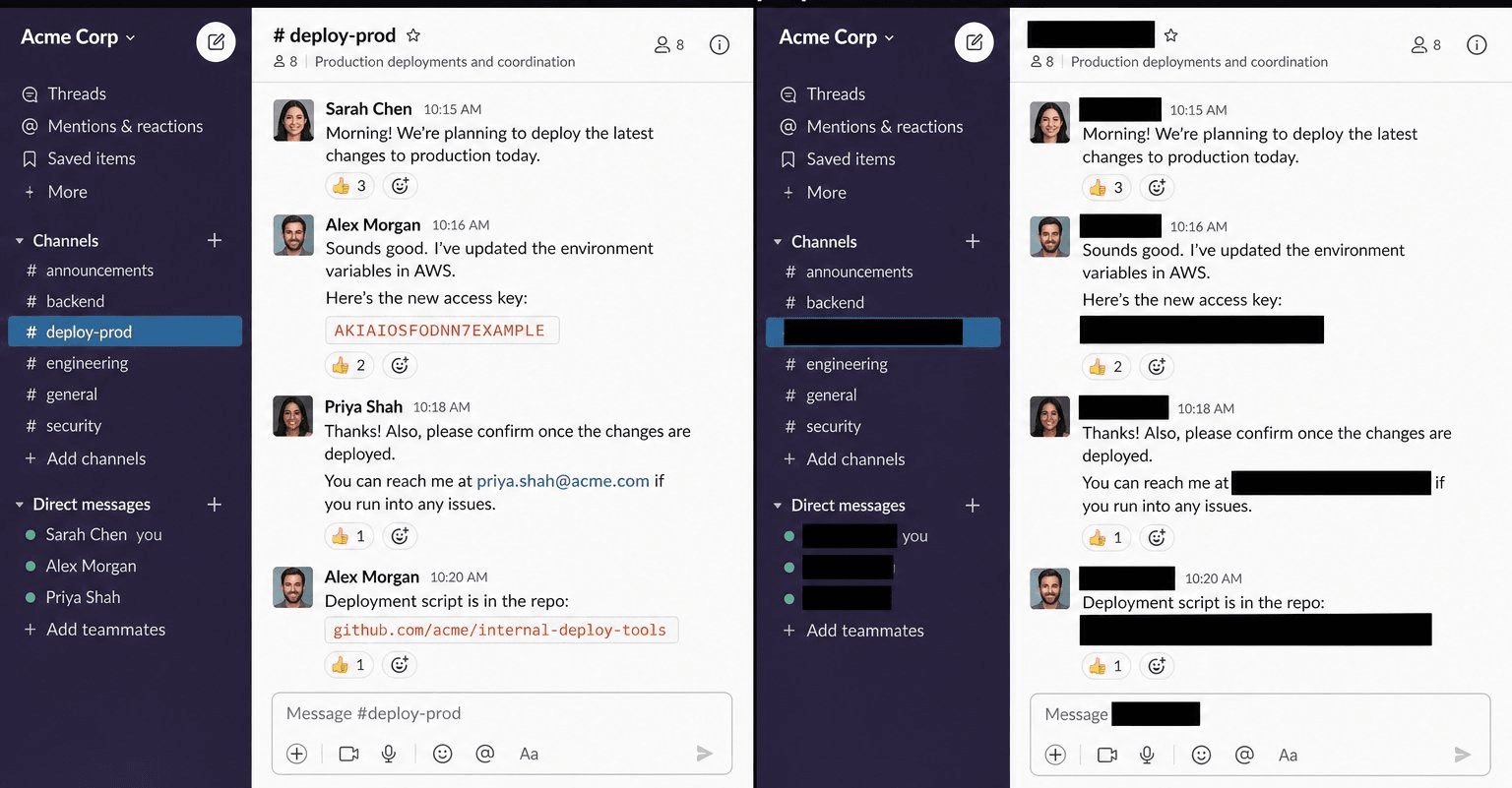
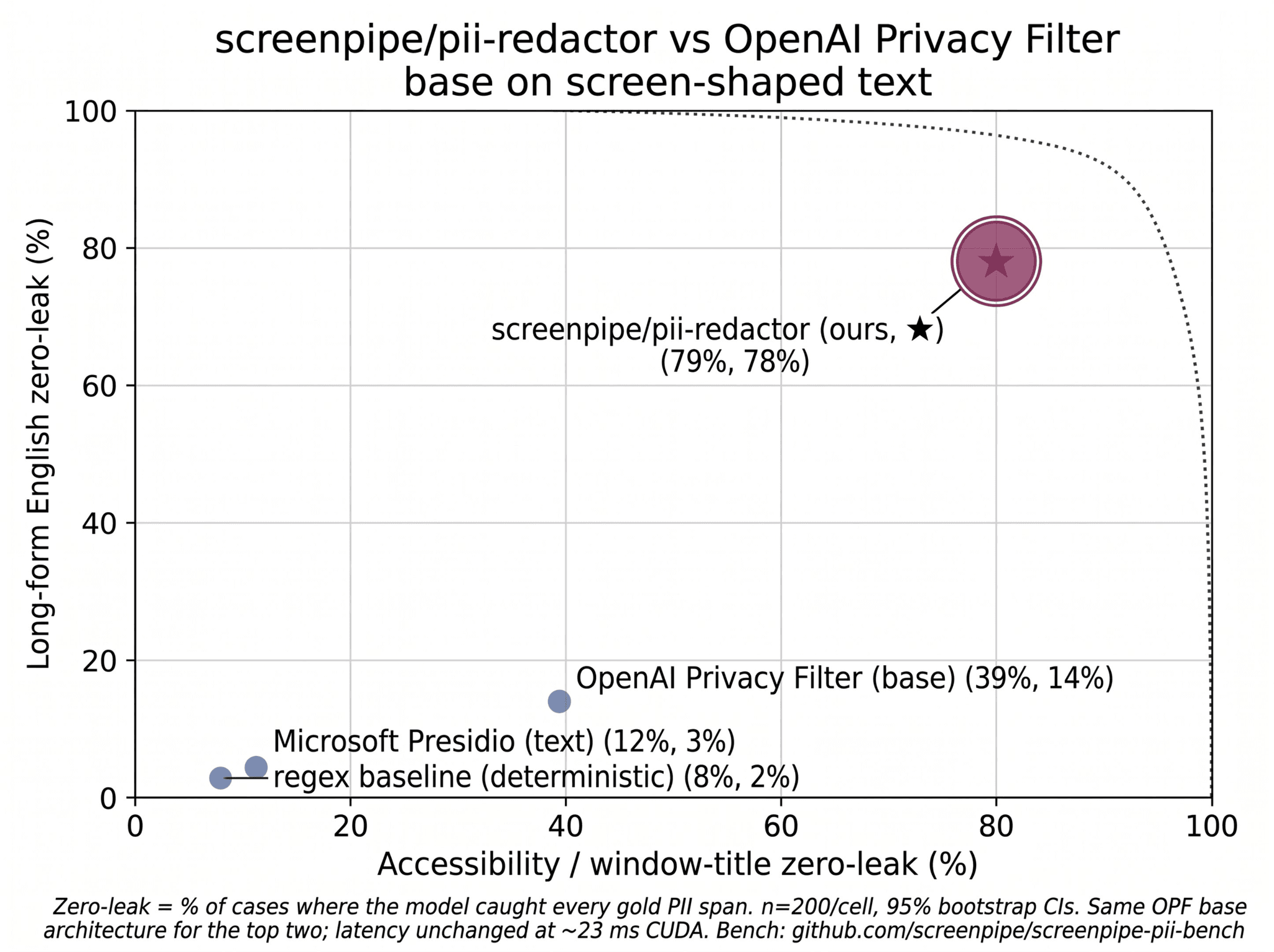
Your data flow, scoped before rollout.
Each device stores its own data in a local SQLite database. No shared database is required for core capture; team reporting, sync, AI, and exports are deployment choices.
where data lives
each device, independently
optional backup
your infrastructure, your rules
Your team won't even notice it.
Runs silently in the background. No popups, no slowdowns. Employees keep full control over their privacy.
what employees see
a tray icon. that's it.
employee controls
privacy is a right, not a feature
block personal apps beyond admin rules
take a break, no questions asked
search and review everything captured
company policies stay enforced
Deterministic control over what AI can access
Define per-pipe data permissions in YAML frontmatter. Enforced at the OS level — not by prompting the AI to behave.
Denied endpoints are never taught to the AI. Deny rules are evaluated first — they always win over allow rules.
Every API call is intercepted at the OS level before execution. Forbidden requests are blocked in-process.
Per-pipe tokens validated server-side. Even if the agent is compromised, the API rejects unauthorized requests.
App & window filtering
Allow or deny specific apps and window title patterns. Deny always wins.
Content type control
Restrict to "ocr", "audio", "input", or "accessibility" — block what the AI should never touch.
Time & day restrictions
Limit data access to business hours (e.g. 09:00-18:00, Mon-Fri). Supports midnight wrap.
Endpoint gating
Control API access per pipe — allow GET /search but deny POST /meetings/stop. Glob patterns supported.
Presets or custom rules
Use presets like "reader" or "admin" for quick setup, or define granular allow/deny rules per pipe.
Per-pipe tokens
Each pipe run gets a unique cryptographic token. Server validates every request.
From process discovery to agentic automation
Capture real workflows, find repeated actions, and decide which SOPs, reports, or agents are worth building first.
Process Discovery & Task Mining
See hidden workflows
- Capture every screen, app switch, and workflow across your org — automatically
- Map how work actually happens — not how people say it does
- Identify bottlenecks, redundant steps, and automation opportunities
Agentic Automation
Deploy AI agents at scale
- Meeting ends → CRM updated with notes, attendees, and next steps
- Standups, reports, and handoffs written from real activity — not memory
- Custom AI workflows deployed to every device via admin config
Time & Activity Intelligence
Eliminate manual tracking
- Billable hours logged without anyone lifting a finger
- App and tool usage patterns across your entire team
- Weekly reports generated from real data, not guesswork
Business Process Optimization
Continuous improvement
- Before/after workflow comparison — measure the impact of changes
- Connect to Slack, Notion, CRM — automate data flow between tools
- AI agents that act on what your team actually does, not what they report
Computer Use & AI Training Data
Turn workflows into AI agents
- Record how your best employees work — every click, keystroke, and decision
- Export structured workflow datasets to train computer-use AI agents
- Build internal automation from real human behavior, not synthetic demos
Compliance & Security
Scoped for review
- Local-only capture is available for pilots and privacy-sensitive workflows
- Team, sync, AI, and connector data flows are scoped per deployment
- Open source — audit every line of code
Buy seats, or start with a workflow report
Most teams should begin with one named workflow, one owner, one deployment path, and one report that decides whether to expand.
Team
Start with a small team and one workflow report.
- Workflow capture across approved devices
- Repeated-action report for the first team workflow
- SOP draft and automation candidates
- Admin dashboard with team-wide insights
- Shared AI workflows deployed to all devices
- Centralized config management
- Employee privacy controls built in
- Weekly strategy call with our team
- Priority support + onboarding call
or leave your email — we'll reach out
Enterprise
For managed deployments, custom storage, and security review.
- Everything in Team
- SSO / SAML authentication
- Complete audit trail & compliance logs
- Three-layer AI permission enforcement
- Dedicated account manager
- Weekly workflow review with your account team
- Managed rollout & MDM deployment
- Security and compliance evidence for review
- Deployment-specific SLA and support terms
- Custom integrations & storage policies
- Volume pricing for 50+ seats
The first report should prove the workflow is worth automating
Pick the workflow before you roll out broadly: Excel to ERP, vendor bill matching, CRM updates, weekly ops reporting, or another repeated sequence your team already performs.